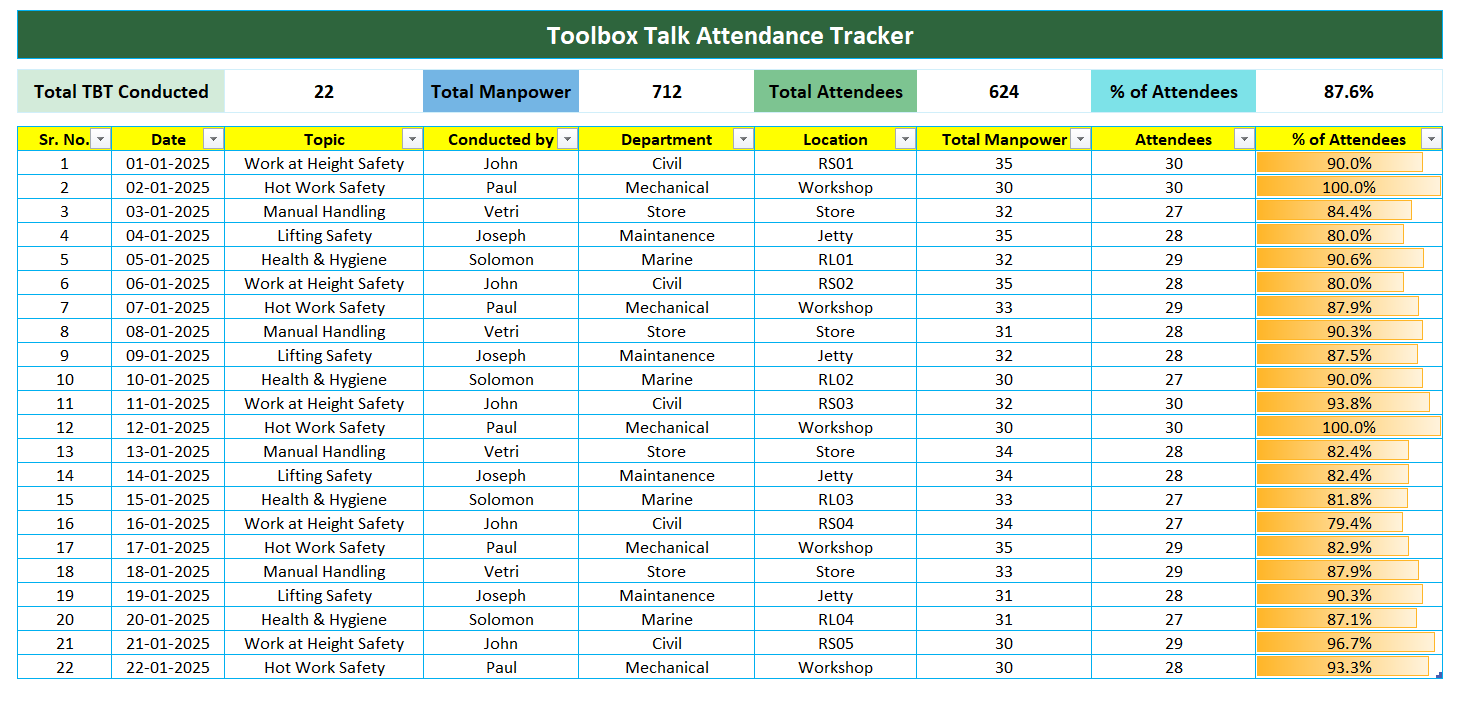
Most companies treat toolbox talks as a box-ticking exercise. Supervisors scribble notes on scraps of paper, lose attendance sheets, or skip sessions when busy. When audits come, they scramble to reconstruct records—often failing compliance checks.
The root problem? A lack of consistent, structured documentation. That’s where a well-designed toolbox talk format Excel sheet changes everything.
This isn’t about form over function. It’s about making safety communication smarter. A properly structured Excel template standardizes your process, ensures nothing slips through the cracks, and creates a verifiable paper trail that protects your team and your business.
Here’s how to build or use a toolbox talk Excel format that actually works—backed by real-world use, not theory.
What Belongs in a Toolbox Talk Excel Format?
A functional toolbox talk Excel sheet isn’t just a blank grid. It’s a dynamic form that captures essential safety data in a repeatable, organized way.
Here are the non-negotiable fields your Excel format should include:
- Date of Talk
- Location / Worksite
- Topic (e.g., Fall Protection, Electrical Safety)
- Lead Presenter (Supervisor or Safety Officer)
- Duration of Talk
- Key Points Covered
- Hazard Identified (if applicable)
- Corrective Actions Taken
- Attendee List (with signatures or initials)
- Follow-Up Required? (Yes/No + Due Date)
Without these elements, your records are incomplete—especially during OSHA inspections. For example, a construction firm in Texas was fined $18,000 because their “safety logs” were just handwritten notes with no attendee verification. A simple Excel tracker with a signature column would have prevented that.
How the Excel Format Improves Safety Compliance
Spreadsheet templates are underrated in safety management. But when used right, Excel turns chaotic paper logs into a structured safety database.
Real Example: Highway Paving Crew in Colorado
This crew switched from paper logs to a shared Excel file stored on company OneDrive. Each foreman fills out the weekly talk using a locked template format. The safety manager reviews every entry remotely.
Results in 6 months: - 100% documentation compliance - 37% reduction in near-miss incidents - Audit ready in under 10 minutes
Excel enables version control, data sorting, and historical tracking—something paper can’t match. You can filter all talks on “confined space entry” over the past year, for example, or export attendance for a specific worker.
That’s not just convenient. It’s audit armor.
Key Features of an Effective Toolbox Talk Excel Template
Don’t just download the first free template you find. Many are poorly structured—missing critical fields or using awkward formatting.
Your toolbox talk Excel sheet should have these practical features:
✅ Pre-Formatted Drop-Down Menus Use data validation for fields like Topic and Location. This prevents typos and ensures consistency. For example, “PPE” instead of “Personal Protective Equipment” or “gear stuff.”
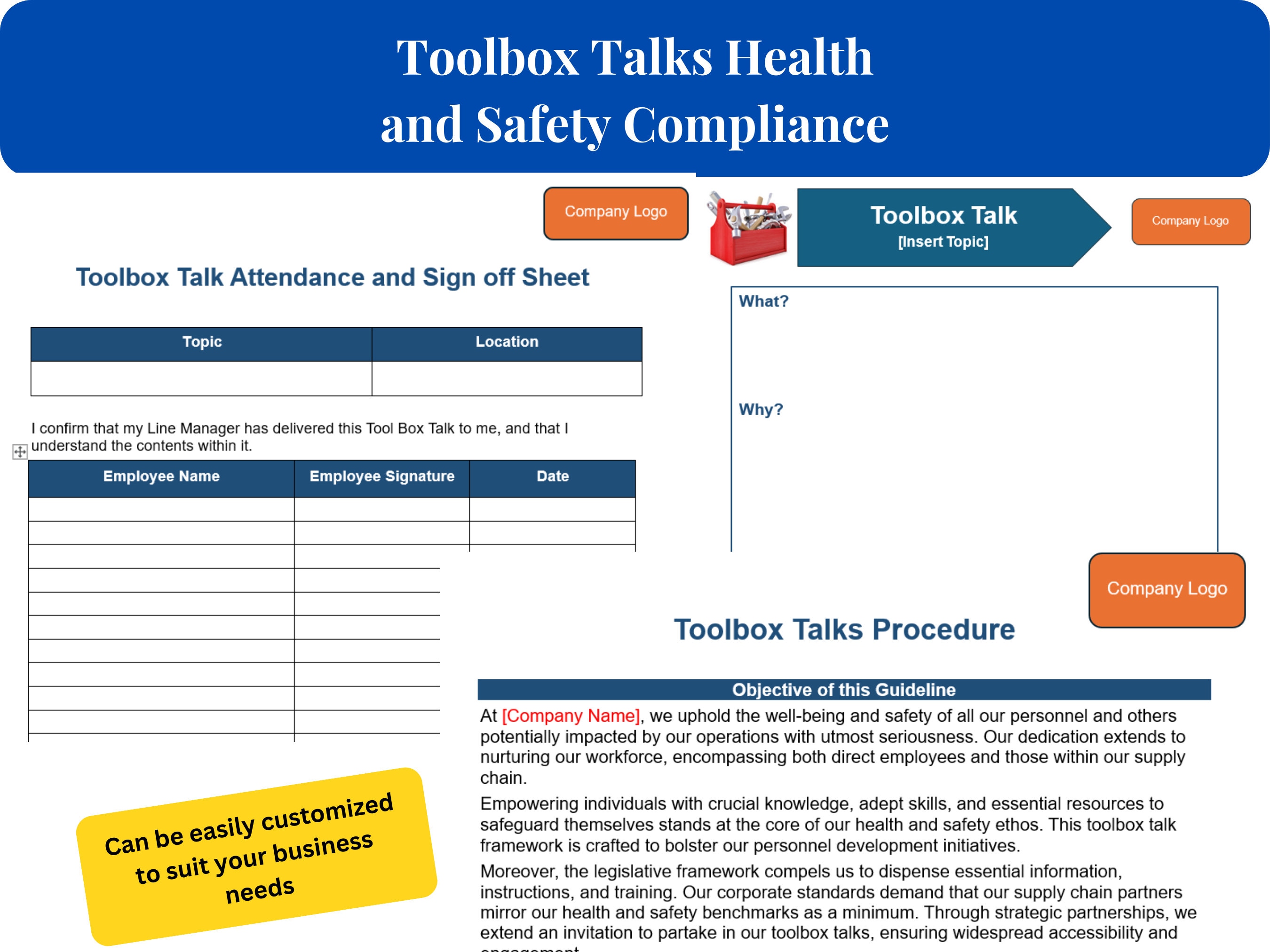
✅ Signature Input via Initials No need for scanned signatures. A column for worker initials is OSHA-compliant and faster to fill.
✅ Automated Date Stamping Use =TODAY() or manual entry—but lock the date column to prevent backdating (a red flag during audits).
✅ Conditional Formatting for Follow-Ups Highlight overdue corrective actions in red. This visual cue keeps accountability front and center.
✅ Tabbed Structure for Monthly Archiving Organize by week or month using worksheet tabs. Label them “June Week 1,” “June Week 2,” etc. This prevents one massive, unmanageable file.
✅ Read-Only Final Version Once submitted, protect the sheet with a password to prevent edits—preserving integrity.
5 Free & Customizable Toolbox Talk Excel Templates (Compared)
You don’t need expensive software. These free Excel formats deliver real value.
| Template Name | Key Features | Best For | Downside |
|---|---|---|---|
| OSHA-Compliant Toolbox Talk Tracker (SafetySmart) | Pre-built topics, signature grid, follow-up tracker | General contractors | No dropdowns by default |
| Construction Safety Excel Log (Template.net) | Monthly tabs, automated date fields | High-frequency sites | Cluttered design |
| Modular Safety Talk Sheet (EHS Daily Advisor) | Editable sections, hazard ID log | Manufacturing teams | Requires manual setup |
| Simple Toolbox Talk Template (Vertex42) | Clean layout, printable format | Small crews, remote teams | Lacks follow-up tracking |
| Advanced Safety Meeting Log (Smartsheet Excel Export) | Conditional formatting, KPI summary | Safety managers needing analytics | Overkill for basic use |
Pro Tip: Download one as a base, then customize it. Rename columns to match your site’s jargon. Add your company logo. Lock formatting to prevent accidental changes.
How to Implement the Excel Format Across Your Team
A great template fails without adoption. Here’s how to roll it out successfully:
Step 1: Standardize the Process Decide:
- Who leads the talk?
- When are talks held? (e.g., every Monday at 7:15 AM)
- Where is the file stored? (SharePoint, Google Drive, shared drive)
Document this and train all leads.
Step 2: Lock the Template Use Excel’s “Protect Sheet” feature. Allow edits only in attendee and notes fields. Prevent deletion of columns.
Step 3: Enforce Weekly Uploads Set a deadline—e.g., “All completed sheets due by 5 PM Tuesday.” Assign a safety coordinator to verify.
Step 4: Audit Monthly Pull a random 20% of talks. Check for:
- Full attendance
- Clear topic relevance
- Action items with closure status
This keeps quality high.
Common Mistakes That Undermine Your Excel Safety Log
Even with a good format, teams make errors that compromise their value.
❌ Copy-Pasting the Same Content Weekly Some supervisors reuse last week’s “Hazard Awareness” talk with no changes. Inspectors spot this instantly. Each talk must reflect actual site conditions.
Example: A crew working near open trenches must have a talk specific to excavation risks—not generic “stay alert” messaging.
❌ Skipping Attendee Verification No initials, no proof. If a worker claims they weren’t trained on fall risks, and your sheet has no signature, you’re liable.
❌ Storing Files Locally on One Phone If the foreman loses their device, records vanish. Always use cloud sync with backup.
❌ Letting Non-Safety Leads Run Talks Without Training A toolbox talk isn’t a status update. It’s a safety intervention. Train leads on how to engage, not just read.
How to Turn Your Excel Sheet Into a Proactive Safety Tool
The best teams don’t just record talks—they analyze them.
Use Pivot Tables to Spot Trends Summarize topics by frequency. If “slip and fall” appears 8 times in 2 months, it’s a red flag. Schedule a site-wide inspection.
Track Corrective Actions to Closure Add a column: “Status (Open/Closed).” Filter monthly for open items. Escalate if overdue.
Export for Reports Need to prove compliance to a client? Export 3 months of talks into a PDF. Sort by date, topic, or lead. Done in 2 minutes.
Why Excel Beats Paper—And When to Upgrade
Excel is the sweet spot for most teams: free, universal, and flexible. But know its limits.
Stick with Excel if you have: - Under 10 worksites - Fewer than 150 workers - No need for real-time alerts or app integration
Consider upgrading to a digital platform if you: - Operate across states - Need automated reminders - Want photo attachments or GPS verification
But for now, Excel—done right—is more than enough.
Final Word: Make Your Toolbox Talk Excel Sheet Work for You
Don’t accept half-filled logs or disorganized records. A properly structured toolbox talk format Excel sheet isn’t just paperwork—it’s a frontline defense against accidents and liability.
Download a reliable template. Customize it. Enforce consistent use. Review it monthly.
When your next safety audit arrives, you won’t panic. You’ll open a clean, complete Excel file and say: “Here’s our record for the past year.”
That’s the power of structure.
FAQ
Can I use Excel for OSHA-compliant toolbox talks? Yes. OSHA accepts electronic records as long as they’re accurate, accessible, and tamper-proof. Use password protection and backups.
How do I collect signatures in Excel? Collect printed initials in a designated column. For digital signatures, export to PDF and use e-sign tools, or switch to a dedicated app.
How often should toolbox talks be held? Weekly is standard in high-risk industries like construction. Some sites do them daily during critical phases.
Can multiple sites use the same Excel file? Yes, if stored in the cloud (e.g., OneDrive or Google Drive). Use separate tabs for each location to avoid confusion.
Should toolbox talk topics repeat? Yes, but with updated details. Revisit high-risk topics quarterly, but adjust content to reflect current site conditions.
How long should I keep completed sheets? OSHA recommends at least 5 years for injury-related talks. For general logs, 2–3 years is standard.
Can I automate reminders in Excel? Not natively. But you can pair Excel with Outlook calendar alerts or use Excel within Microsoft Power Automate for notifications.
FAQ
What should you look for in Toolbox Talk Format Excel Sheet: Free Template & Best Practices? Focus on relevance, practical value, and how well the solution matches real user intent.
Is Toolbox Talk Format Excel Sheet: Free Template & Best Practices suitable for beginners? That depends on the workflow, but a clear step-by-step approach usually makes it easier to start.
How do you compare options around Toolbox Talk Format Excel Sheet: Free Template & Best Practices? Compare features, trust signals, limitations, pricing, and ease of implementation.
What mistakes should you avoid? Avoid generic choices, weak validation, and decisions based only on marketing claims.
What is the next best step? Shortlist the most relevant options, validate them quickly, and refine from real-world results.